Trainers and online facilitators spend hours in virtual meetings and classes without realizing their setup is weakening their image. To prevent your virtual presence from undermining your expertise, this article equips you with actionable tech checks, setup tips, and insight into how each element influences learning.
As a trainer, you probably spend more time on camera than on any physical stage now, yet you may still treat virtual presence as a “nice-to-have” polish rather than a core display of your credibility and attention to detail—or worse, as an afterthought.
The good news is that it’s easy to create a great virtual environment with a few specific choices that measurably shift how your message lands.
Virtual Presence Is Not Cosmetic
Studies show that 72 percent of Learning and Development (L&D) professionals see learner engagement as their top virtual challenge. Snap judgments form in seconds based on your online presence, often even before you speak. Research on online and hybrid courses reveal that when learners perceive strong teaching presence and social presence, they participate more and perform better. In virtual training terms, that translates into more cameras on, more questions asked, and more engagement with your activities—because participants feel like a real, attentive person is with them, not just a voice and slides.
Poor virtual setups risk credibility loss. Other negative impacts are:
- Lower performance and completion rates
- Already-struggling learners are more impacted by virtual presence
- Cluttered backgrounds alone can cut perceived trustworthiness by more than 50 percent
- More costly communication breakdowns
For training pros in Zoom-heavy roles, even modest upgrades in clarity, visual order, and on‑camera presence pay off quickly in credibility and learner trust—often faster than content improvements alone.
A concentrated emphasis on the six often-overlooked elements below can signal “I’ve got my act together.” When you master these, audiences will focus on content rather than distractions.
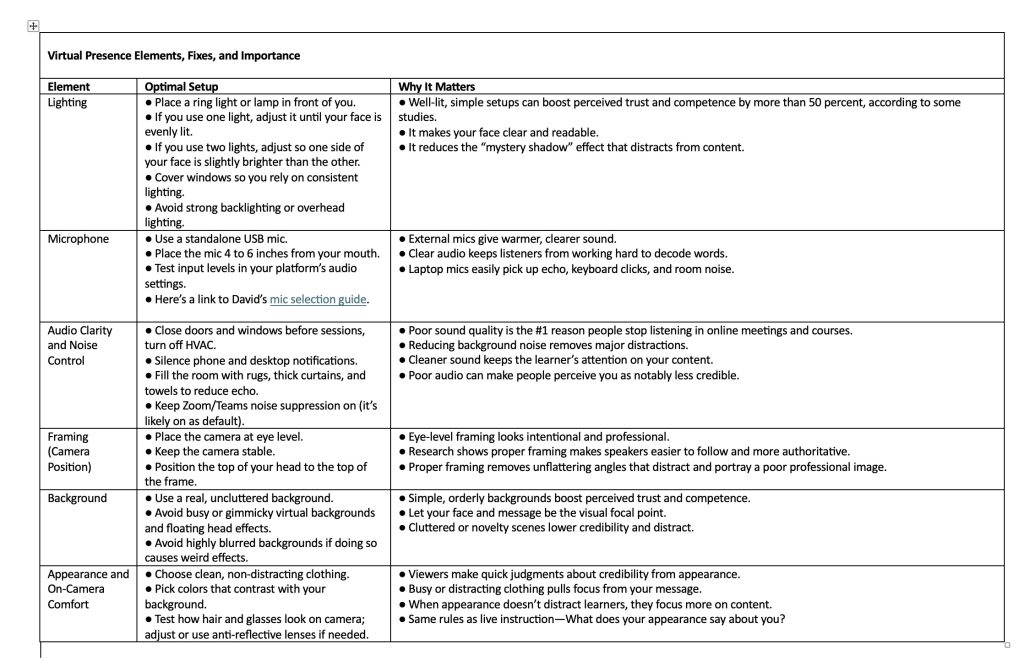
Elements, Fixes, and Importance
These elements quietly shape the learning experience. They sound basic, but they are often the thin line between “I trust and can follow this trainer” and “I’m spending half of my attention fighting the medium.” Here are some quick fixes and why they make a big difference for learners and trainers alike.
How These Elements Impact Learning
Lighting: Learners can see micro-expressions, emphasis, and encouragement, which strengthen social and teaching presence and help them feel more connected, participate more, and trust you more.
Microphone and Audio: You can’t learn what you can’t hear. Clear voice reduces cognitive load, freeing mental bandwidth to process concepts rather than “fighting the sound,” thereby supporting better retention and on-the-job application.
Audio Clarity: Pay attention to other sound factors that can impede learning, such as dogs barking, chairs creaking, or other household noises. Extraneous noise is more than an annoyance. Noise suppression helps, but it doesn’t replace a quiet room.
Framing: What you look like directly affects how people process you and your message. You’ve seen odd camera angles that distort images and scream “laziness,” “lack of attention to detail,” and “unprofessionalism.” When you appear as a steady, centered presence, learners unconsciously relax and don’t have to work as hard to decode your nonverbal cues.
Background: Backgrounds are not decor; they are part of your message. One study on virtual first impressions found that people framed by simple bookcases or plants were rated as more trustworthy and competent than those in front of cluttered or novelty backgrounds. In a training context, a chaotic background quietly suggests disorganization. Virtual backgrounds can work if they’re subtle, but they shouldn’t distract from your facial cues.
Appearance: People make judgments in seconds that influence your credibility. They choose whether or not to pay attention—and learn. Consider the image you wish to portray, just as you would in person. When appearance “disappears” into a coherent overall picture, learners pay more attention to your explanations and less to visual quirks, which supports better initial engagement.
Voice, Pausing, and “Reading the Room”
Voice and Prosody: Improve your impact by intentionally slowing your pace 10 to 15 percent, adding short pauses at transitions, and emphasizing key words rather than speaking in a flat, rapid stream. Research on pauses and vocal variety shows that brief silences and clear emphasis increase perceived clarity and credibility compared with rapid-fire responses.
Pausing: Because it’s more difficult to hear and follow along online, pausing and pacing become critical, so use a brief six-second pause before answering questions or moving on to give learners a chance to catch up, let the content sink in, and take notes. Pause before beginning and slow down your first words. It takes the human brain a few seconds to tune in to your voice.
Read the Virtual Room: Just as you do in person, it’s important to engage virtual learners with eye contact, questions, and other interactive activities. First, establish direct eye contact with your camera. Then, occasionally scan the thumbnails and the chat to monitor interactive cues and learner engagement:
- Are they on camera or off?
- What is their body language telling you—leaning into their camera or laid back?
- Are they asking good questions and engaging in others’ responses?
- Are they interacting with each other or only with you?
Tips to Boost Engagement
- Ask short, concrete questions. Rephrase them so others understand.
- Use interactive polls to solicit responses.
- Invite thumbs-ups and responses in the chat.
- Acknowledge names and contributions out loud.
- Have a producer or chat monitor to bring questions to your attention and address technical issues individual learners may have.
Studies on teaching presence and social presence in online environments tie responsiveness and perceived attentiveness to better engagement and satisfaction. Learners stay with you online when they feel seen and invited in.
Quick Implementation Steps
- Daily Habit: Do a 2-minute tech check before any session, fix issues before participants arrive, and have a backup mic and helper for glitches.
- Weekly Practice: Record a five-minute training snippet; critique using the checklist.
- Team Rollout: Host a one-hour group workshop to see quick gains in collaboration and commitment to polishing their virtual presence.
Call to Action: Make Virtual Presence a Team Standard
When you put intentional tech, strong presence, and thoughtful voice together, virtual training starts to look very different. Research may show that poorly designed online learning often produces worse outcomes than in-person training—especially for less prepared learners. Newer studies also find that well‑designed, interactive virtual programs can match in‑person results when they build a strong presence, clear communication, and active engagement.
That’s encouraging for training managers, because it means you’re not at the mercy of the medium: You control how your trainers appear on screen, how they sound, how they pause and read the room, and how deliberately they invite interaction.
Over the next 90 days, treat those factors as core instructional design choices by:
- Standardizing a one-page tech-and-presence checklist for every facilitator
- Offering a short internal workshop on voice and virtual presence,
- Tracking three simple engagement behaviors—camera‑on rates, chat participation, and voluntary questions—to see just how much more your learners retain and apply when virtual presence becomes a team norm.
Virtual Presence Is Beyond Tech
It’s clear that virtual learning can fall short when presence and interaction are afterthoughts. It is equally clear that when you, as a trainer, show up with deliberate tech choices, intentional voice, and a real sense of being “in the room” with your learners, virtual sessions can earn their place alongside the best in‑person training.
References
- ELB Learning, “72% of Training and L&D Professionals Cite Learner Engagement as Top Virtual Training Challenge,” news release, March 4, 2025.
- San Jose State University School of Information, “Teaching Presence in Online Courses,” last modified October 4, 2020 (https://ischool.sjsu.edu/ciri-blog/teaching-presence-online-courses)
- Scollin-Mantha, Jo-Anne, “Student Perceptions of Social Presence and Its Influence on Satisfaction, Learning, and Persistence in Online Courses,” Ph.D. dissertation, SUNY Albany, 2008; summarized in San Jose State University School of Information, “Teaching Presence in Online Courses.”
- Bates, Tony, “Research Showing That Virtual Learning Is Less Effective than Classroom Teaching—Right?” Online Learning and Distance Education Resources (blog), August 26, 2021 (https://www.tonybates.ca/2021/08/26/research-showing-that-virtual-learning-is-less-effective-than-classroom-teaching-right/)