Learning and Development (L&D) departments are under pressure to deliver more courses, align them with skill gaps, and do so without growing the team. That’s why artificial intelligence (AI) has quickly become part of the learning management system (LMS) buying conversation.
In fact, “AI-powered LMS” can mean very different things from one vendor to another: a recommendation engine, a chatbot, a content generator, analytics, automation, or all of the above.
So the practical question is not simply, “Does this LMS have AI?” but “Where exactly will AI reduce manual work, speed up training delivery, or make learning easier to manage?”
Choosing the Right AI-Powered LMS
In this article, we’ll look at five things to evaluate before choosing an AI LMS, so you can separate useful AI from features that can look good in a demo but do little for your actual training workflow.
1. Start with your actual pain points, not the AI feature list.
When choosing an LMS, many companies make the same mistake: They compare AI features before they know what they need AI to fix. Smart recommendations, content creation, AI-generated reports, skills analytics—all of it sounds useful until you ask what problem it actually will solve.
A practical tip: Before any vendor demo, ask your team to write down three to five processes that take the most time or create the most delays. Keep them specific, such as:
- Preparing monthly completion reports for department heads
- Updating product walkthroughs or compliance courses
- Helping employees find relevant content for specific skill gaps
Then use this list during the demo. For every AI feature the vendor shows, ask yourself: How much manual work would it save? Who would use it every week? If the answer is vague, don’t let that feature drive the AI learning management system buying decision.
2. Check whether AI supports the real training workflow.
AI can exist in the LMS and still have little impact on productivity. If it doesn’t fit within the real workflow, your team won’t use it often enough to make a difference.
For example, an AI-powered LMS might have a chatbot that answers learners’ questions. But if it can’t use your training catalog, respect permissions, or guide employees to assigned courses, it could create more confusion than value.
Or AI may generate strong course text, but if your team still has to copy it into an authoring tool and design the course themselves, the actual time savings are questionable.
This is where iSpring LMS is a good example of practical AI. The platform includes an AI course builder, so you can just upload your source materials or audio, define the course topic, audience, learning objectives, and tone, and generate a solid, structured course draft in a snap.
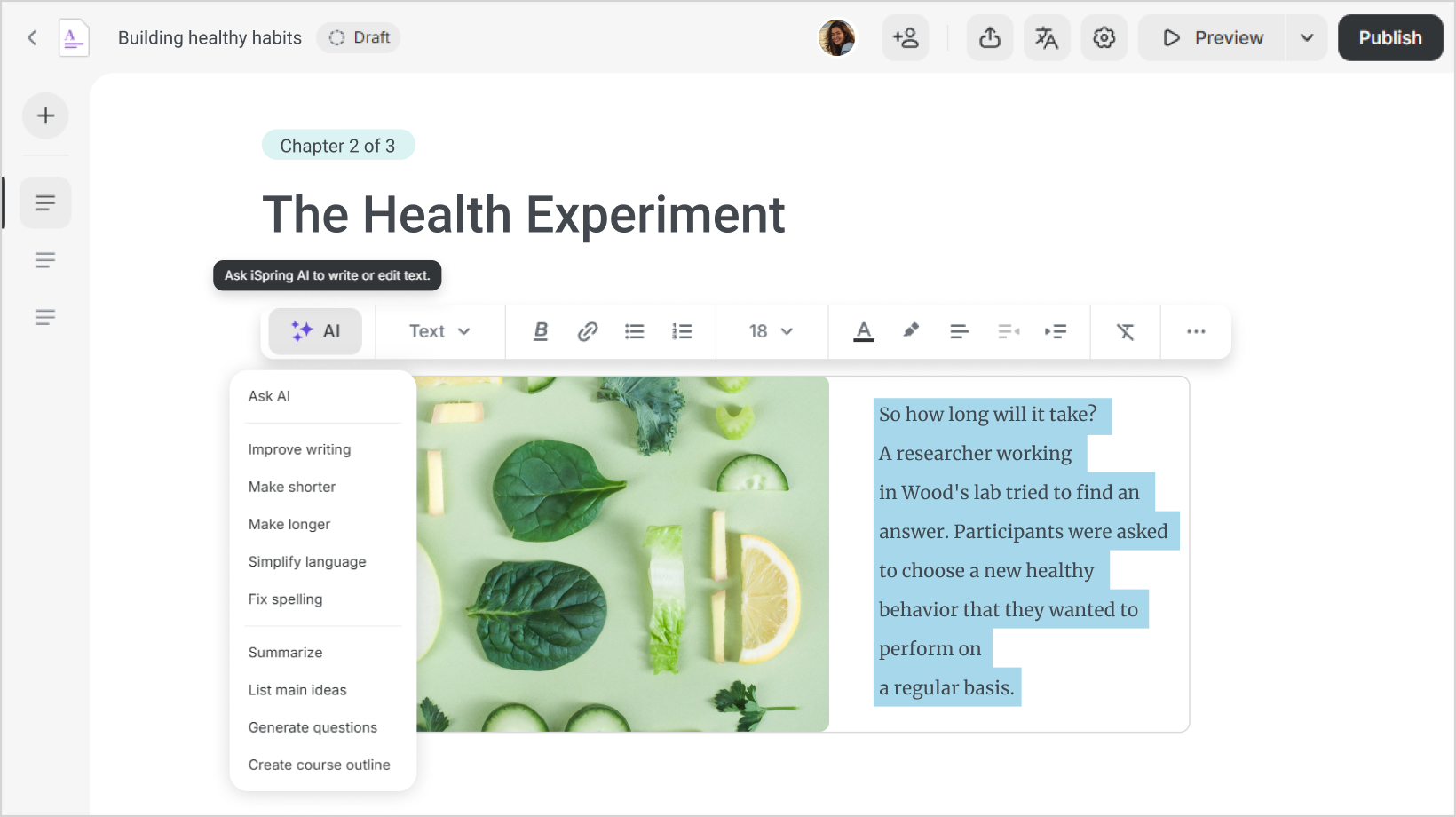
Then you review, edit, and publish the result instead of starting from a blank page or moving content between several tools.
For L&D teams, this is especially useful for training that needs to go live quickly: onboarding, compliance updates, product training, frontline instructions, and internal knowledge refreshers. These are not always the courses that require months of custom design. Often, they need to be accurate, clear, and launched quickly. An AI LMS should help with exactly that kind of everyday training work.
3. Don’t let AI distract from core LMS requirements.
AI won’t compensate for a weak LMS foundation. Before you compare AI features, make sure the platform can handle the basics well: user and group management, automated assignments, learning paths, reporting, certification tracking, mobile access, integrations, permissions, and security.
This matters because AI usually adds value on top of existing workflows. If the training assignment process is still clumsy, reports are hard to build, or learners struggle to navigate the interface, AI will not fix the operating problem.
Practical tip: Ask the vendor to show a standard training rollout with no AI involved. If that workflow feels slow, confusing, or overly manual, treat it as a warning sign.
4. Test the LMS with your own materials, not vendor-perfect examples.
A polished demo only proves that the AI-powered LMS works with polished inputs. Your real training environment is usually messier: inconsistent course titles, custom roles, regional permissions, outdated PDFs, and incomplete learner data.
Use the LMS free trial to test AI against your actual conditions. With an LMS that provides AI course creation, try using it on a dense policy document, a rough subject matter expert (SME) deck, or an internal guide. If it offers course recommendations, verify them against your actual catalog and learner roles. When it offers AI-assisted reporting, ask questions that your stakeholders ask.
Then look at the work left after AI does its part. How much cleanup was needed? Were the recommendations relevant? Were the reports actionable? The remaining work is the real cost of the AI feature—and the best signal of how much time it will save.
5. Calculate value in hours saved, not AI features owned.
For course creation, the calculation is fairly direct. If your team creates or updates 10 courses a month, how many hours go into structuring content, writing drafts, creating quiz questions, formatting pages, and preparing materials for launch? If AI can reduce that first-draft work, the value is apparent.
Or take platform administration. Beyond authoring, iSpring LMS has a built-in AI assistant that provides instant step-by-step guidance and links to relevant help materials.
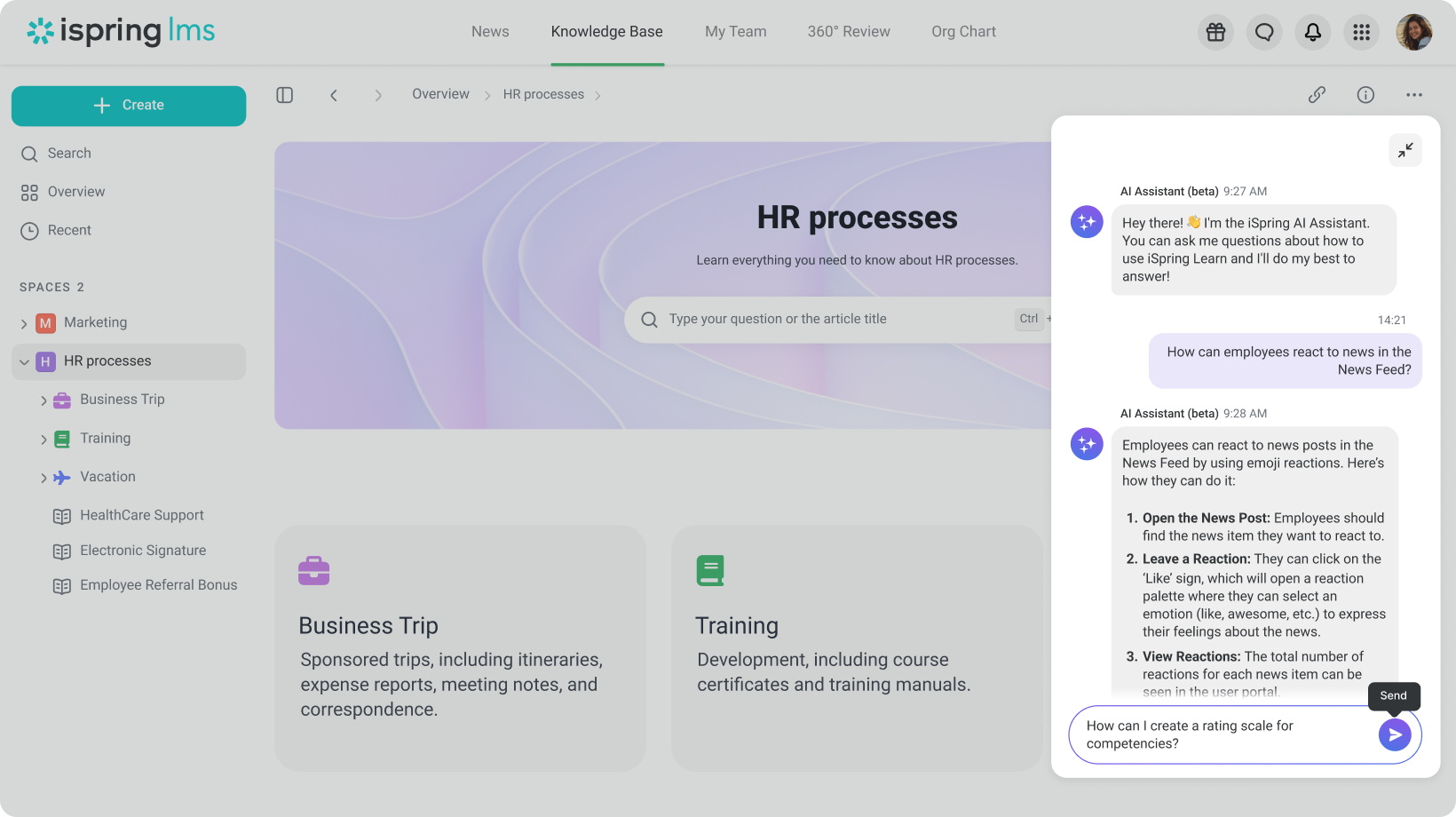
For admins, that means fewer small blockers when they need to set up learning paths, find reports, manage users, or use features they don’t touch every day.
Сount how many routine platform questions your admins handle each week, then multiply that by the time usually spent searching help docs, asking colleagues, or waiting for support.
In Closing
Choosing an AI-powered LMS is also a stress test for your learning operation. If your content is outdated, roles are unclear, reports are inconsistent, or workflows rely on too much manual work, AI will expose those gaps quickly.
The right platform should help you move faster without adding more complexity. Look for an AI-powered learning management system that fits the way your team works; supports the processes you need to improve; and keeps L&D in control of quality, data, and outcomes.